Sunday, August 7, 2011

The marvellous Mac.

I briefly blogged a while back that I'd taken the plunge and purchased a new Macbook Pro (13" i5 Thunderbolt). I've set this up as a desktop replacement, connecting it to my existing Samsung LCD monitor, giving me a 2-screen set-up, perfect for photo editing which is my main use for it. Having lived with this for a few months now (and recently upgrading to Lion), I can confirm it is everything I hoped it would be.

For a long while I've wanted to break free from Windows but have never found a satisfactory alternative in Linux. Nice as many distributions are (especially my favourite, Fedora), they all have one fundamental flaw - lack of support for commercial desktop apps. I wish to use MS Office, Photoshop, and iTunes - all of which just do not exist on Linux (although, of course, similar alternatives are available). Having tried hard to migrate to these alternatives, they simply do not give me the functionality I want. As such, I had 2 choices: stick with Windows, or 'Think Different' with a Mac.


So, how have I found the Mac? It's not perfect, but it's pretty damn close, and to be honest, it's by far the best computing experience I've ever had. Here are the pros and cons as I see them:

Cons:
  • Despite the powerful processor and large memory, apps still tend to 'hang' more often than I'd like, exhibiting the spinning beach ball pointer while they think about what to do next. What's that all about?
  • The hardware is somewhat expensive compared to equivalently specified Windows laptops.
  • Hmm, I can't think of any more cons!

Pros:
  • The hardware, despite it's price, is absolutely exquisite. The aluminium unibody detail is wonderful - having a solid base with no fans to suck the fluff from your trousers means you can properly use it on your lap without fear of gunging up the internals.
  • Wonderful screen.
  • Very quiet most of the time - silent hard disk, very quiet fan, and no flashing activity lights. Fan does get noisy when the processor is working hard however.
  • Great backlit keyboard, although the flat keys take a little while to get used to.
  • Appstore - borrowing heavily from Linux repositories as a way of distributing software, I have to say this is such a good system. Being able to purchase high quality apps and install them almost instantly is just better.
  • Support for commercial apps on a Unix-based system is great - MS Office is very smart on the Mac, and I have since moved from Photoshop to Aperture which is simply a joy to use.
  • System updates are handled in a smooth and unobtrusive way, similar to Linux. No longer do I have to suffer Window's insistence that, before you can get any work done, you must spend half a hour installing updates.
I've always been dismissive of Macs as expensive form-over-function devices, although I have always admired OSX since it's release. Whilst they do cost more, I genuinely believe you get value for money especially with such a high quality of build. I can't see myself replacing the hardware for many years, and with OS upgrades for only £20, and apps cheaper via the appstore, the running costs feel less than Windows.

So, I'm very happy to kiss goodbye to Windows. I also bid a fond farewell to Linux desktops (although I will still run some form of Linux on my netbook - currently Fedora 15). If you too are trying to break free from Microsoft's finest, and Linux just isn't delivering, then save-up and buy a Mac - you'll love it.

Thanks for reading, Nick

Monday, July 11, 2011

Note to self: coming soon!

Long-overdue blog updates coming, featuring:

  • Mac OS X vs Linux - which is my favourite Windows alternative and why?
  • Fedora 15 - in my mind the best Linux desktop out there.
  • Cars: The Goodwood Festival of Speed
  • Google +
  • Chromebooks
  • Photos & cameras, including my new quirky favourite: Olympus EPL-1 fitted with a Lumix 20mm F1.7 'pancake' lens.
  • More music lists.
  • Possibly some work-related talk.

Come on then Nick - warm-up those fingers.

Monday, February 28, 2011

Irresistible Apple

I've finally been sucked-in to the hype and can resist the shininess no more. Last week I ordered my first Apple Mac - a brand new i5-powered Macbook Pro 13". It's the base-level machine only with the HDD expanded from 320 to 500Gb:


This left the factory in China today according to UPS - once it arrives I may post some comments on how it runs. Next stop Germany by the looks of it. Handle with care please UPS!


Nick

Monday, January 17, 2011

Linux Mint Debian Edition - a green goddess

Still on the hunt for the ultimate netbook Linux distribution, I recently discovered a great new project by the Linux Mint team. Until recently they have focussed on re-packaging Ubuntu Linux into a more attractive desktop distribution. Recently though, they have launched a project which, like Ubuntu itself, is now based directly on Debian. However, unlike Ubuntu, Linux Mint Debian Edtion (LMDE) is based on Debian's 'testing' branch, which means that instead of having a periodical release schedule, new updates are added all the time. In theory then, you install LMDE once, and once only. Just run online update to keep up with the latest developments.

So the rolling release philosophy, along with Mint's exquisite design and artwork, for me combine into a very interesting project. I've just installed it onto my HP Mini 110 netbook and can confirm it works a treat. It takes a little more effort to set-up than, say, Ubuntu, but in theory I should never have to re-install, and the pay-off is to enjoy the Mint team's wonderful attention to detail. Below are some screenshots, plus my installation notes in case anyone else wants to try this on the HP Mini, or similar netbook.

Screenshots:
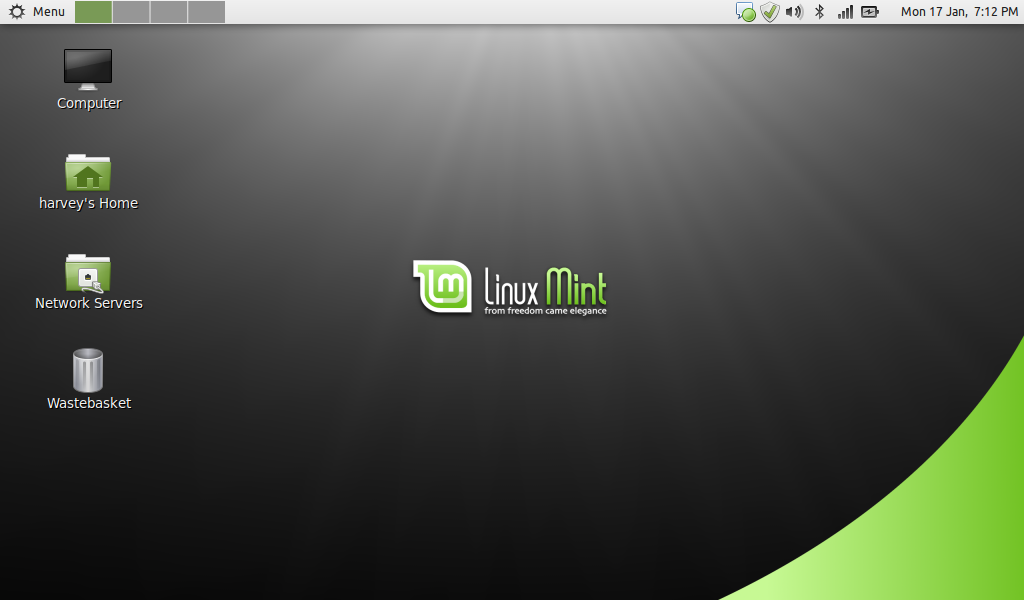
The standard desktop, with my own minor customisations for my netbook.

Mint uses a custom 'start' menu which is extremely functional and very attractive. The best I've used in any distribution.

Mint's theme applied to the standard Gnome file browser.

Mint's software centre for finding and installing apps.

Installation notes:
These notes are for my installation onto the HP Mini 110 based on my own needs. This is not an exhaustive guide, but I've tried to include as much detail as possible:

Setting up an SD card with 32 bit Mint Debian DVD for installation:
Format a 2Gb or larger SD card with FAT32 on Windows.

Download the 32 bit DVD .iso from the Mint web site (http://www.linuxmint.com/edition.php?id=66) and install to SD card using Windows UNetbootin (download from http://unetbootin.sourceforge.net/). I used the 'Mint 9 Live' preset.

Installation:
Connect wired LAN cable (needed to install wireless driver).
Insert SD card into netbook and switch on.
Press 'F9' on BIOS screen to select boot from SD card.
At UNetbootin boot menu, select 'Default'
Boot to the live desktop, then install system using the standard installer with the following options:

Computer name: hp-mini-110
Install GRUB on /dev/sda

When prompted. re-boot into the new desktop, install all updates, & reboot once more.


Fix missing wireless:
Install propriatary Broadcom driver thus:

In a terminal, type:
sudo aptitude update
sudo aptitude install module-assistant wireless-tools
sudo m-a a-i broadcom-sta

sudo vi /etc/modprobe.d/broadcom-sta-common.conf
Append the file with the following:
blacklist brcm80211

sudo update-initramfs -u -k $(uname -r)
sudo modprobe -r b44 b43 b43legacy ssb brcm80211
sudo modprobe wl
sudo iwconfig

Then reboot, disconnect your wired LAN cable, and configure wireless using Gnome Network Manager.


Install some essential apps:
Install using Software Manager or via terminal:
sudo apt-get install chromium-browser ttf-mscorefonts-installer gnome-alsamixer


Disable PC speaker (to stop an annoying buzz on boot and shut-down):
Launch Gnome Alsa Mixer, and mute the PC Speaker.


Desktop settings:
Desktop Settings -> Change button layout to 'Left - Mac like'.
Change panel from bottom to top.
Remove 'show desktop' icon from panel and replace with 'workspace switcher'.

Add Computer, Home, Network, and Trash icons to right-hand side of desktop using Desktop Settings. Untick Mounted Volumes.


Enable Compiz
Add the following Gnome startup entry:

Name: Compiz
Command: compiz --replace
Description: Start compositing manager

Reboot to enable Compiz, then In CCSM select:
General Options -> Focus & Raise Behaviour: Untick 'click to focus'. Tick 'auto-raise'.
Enable Application Switcher
Enable Minimize Effect
Move Window -> Change opactity to 75%
Enable Desktop Cube and Rotate Cube (needed to enable multiple desktops, otherwise you are stuck on just 1)
Desktop Cube -> Change cube colour to black (to remove blue cube top & bottom)
Rotate Cube -> Transparent Cube -> 'opacity during rotation' = 50%


Configure Power Management:
On AC Power:
Put computer to sleep: Never
When laptop lid is closed: Shutdown
Never spin down disks
Put display to sleep: 30 minutes

On Battery Power:
Put computer to sleep: 10 minutes
When laptop lid is closed: Shutdown
When laptop power is critically low: Suspend
Do spin down disks
Put display to sleep: 5 minutes
Do reduce backlight brightness

General:
Keep default settings


Configure Firewall and allow browsing Samba shares on Windows PCs, etc:
In a terminal type:
sudo vi /etc/default/ufw

then change:
IPT_MODULES="nf_conntrack_ftp nf_nat_ftp nf_conntrack_irc nf_nat_irc"

to:
IPT_MODULES="nf_conntrack_ftp nf_nat_ftp nf_conntrack_irc nf_nat_irc nf_conntrack_netbios_ns"

Save and exit vi, then in a terminal type:
sudo ufw enable
sudo reboot

And that's about it. I hope I've inspired you to try this interesting new distribution - I'm certainly hoping to keep it on my netbook in the long term.

Thanks for reading,
Nick

Sunday, October 17, 2010

1,000 mph on the streets of London

I like fast cars, and none come faster than Britain's latest attempt on the world land speed record - Bloodhound SSC. SSC stands for Super Sonic Car, which is precisely the aim of this latest project - a car which breaks the sound barrier (around 750mph) and then press on to over 1,000mph. Fiction you might think? Well, think again, as today the full-sized mock-up of the car was on-show on The Strand in London.


I have childhood memories of Richard Noble breaking the record in Thrust 2, but it was Thrust SSC (the first and only official supersonic record holder) which really captured my imagination. This car was run in the Black Rock desert in autumn 1997, a time when I was in Canada attending an extended software training course at Nortel. It was a fantastic time, and to be able to follow the record attempts on line, via the web site and e-mail updates, was cutting edge at the time and really engaged us followers in the runs. The webcam pictures of the Airshelta told you when the car was running (i.e. it was empty), and I still remember checking my e-mails in the classroom when instead I should have been paying attention to the lesson, and the day the record was broken. I wish I'd kept that e-mail!

Now the team are attempting to break their own record with Bloodhound, and I'm both a member of the supporters' '1K club', and an educational ambassador for the project, which is one of the key objectives of Bloodhound. In a world where land speed records may be a little out of fashion (ecologically, financially, etc) Richard Noble has put the emphasis on Bloodhound to make it a vehicle to inspire young students to pursue careers involving Science, Technology, Engineering, and Mathematics. To this end, Bloodhound is working closely with the UK government's STEM organisation, and ambassadors like me are taking the Bloodhound message into schools and hopefully inspiring more kids to go on to be the UK's technology pioneers of the future. I think it's a great idea, and I understand Bloodhound is proving a very popular addition to the curriculum.

Below are a few shots from today's demo in The Strand (including an appearance by Mr Noble who is a real star wherever he goes). I hope the traffic wasn't held up too much - buses, taxis, coaches, and even traffic wardens were pulled in to help set the scene! Good fun. Meanwhile, I urge you to visit the project's web site, and join the 1K club or contribute in any way you can.


[edit]
Some of my shots made it to the project's web site!

Thanks for reading,
Nick

Wednesday, September 8, 2010

A brand new word processor from 1995!

I received an e-mail out of the blue last week from a stranger. His name was Andreas Magerl from Germany, and he asked the a question: "Are you the Nick Harvey who wrote TextEngine for the AMIGA?"

After a quick flashback to a pre-internet 1990s, I recovered enough to reply "Yes"! As it turns out, Andreas runs an online magazine at http://www.amigafuture.de/ servicing what appears to be a thriving Amiga community. TextEngine was a hobby of mine during my younger years. As an owner of an Amiga A500, and later an A1200, I decided to programme my own simple word processor just for my own use. By today's standards it's no better than Windows Notepad, with a couple of additional features. But for me it did the job. For fun I submitted version 1.0 to Amiga Format Magazine who very kindly included it on their cover disc (issue 25, August 1991 to be precise). From there I released it into the Public Domain as a fully functional shareware product (via 17 Bit Software in the UK - now Team 17 -  if I remember rightly), and was very lucky to receive some donations from generous users all over the world.

Even though back then the Internet as we currently know it didn't exist, there was a growing FTP site called Aminet, the de facto repository for Amiga Public Domain software. TextEngine has resided there in good company for many years, and looking back it feels like that was in some way one of the places today's open source community has grown from. I hope it was.

Anyway, getting back to Andreas - he suggested I re-release TextEngine as a freeware product. Once he convinced me there would be a demand (I was rather sceptical) I fired up Devpac (within the incredible WinUAE emulator running on my PC) and was quickly making changes to my 15 year old 68000 source code. The result?

http://aminet.net/package/text/edit/TextEngine

And Andreas was right about the demand - it's been online for 2 days and has so far had over 100 downloads. So many thanks to everyone who has downloaded the 144kb file and still find it useful. Also an especial thanks to everyone who sent in money during the Shareware days - your names all still appear in the Amiga Guide file which accompanies the programme. And a final thanks to Andreas for giving me a brief opportunity to return to the good old days. TextEngine was a real pain to programme - I wouldn't do it again, and have no plans to return to it, but seeing it on-line, on magazine cover discs, and in magazine reviews (even the bad ones!) was very satisfying indeed.

And for those young kids amongst you who never enjoyed owning an old 16 / 32 bit computer such as the Amiga, here are some screenshots...

TextEngine's icon on a sparse desktop

TextEngine, editing its own source code

A very basic spell checker, but better than nothing

Thanks for reading,
Nick

Thursday, August 12, 2010

Cool stickers from Google's GMail Team

I'm a GMail user, and received an envelope full of nice stickers in the post this morning. Here they for the curious:


Thanks Google! But what does it all mean...?